TL;DR
- Native connectors cover most teams. A one-click, admin-only install handles call logging, screen-pop, and field mapping for Salesforce, HubSpot, Pipedrive, Zoho, and 100+ tools.
- The Public API is a standard REST API rooted at api.aircall.io/v1, capped at 120 requests per minute per company, with a hard 10,000-item ceiling on Calls and Contacts.
- Two data flows, not one. Webhooks push real-time events to you, and the Public API is what you call to read records and write back notes, tags, users, and availability.
- Authentication splits by audience. Basic Auth for your own account, OAuth 2.0 for a Marketplace app used by many customers.
- Known walls. No live audio and no real-time call control via REST (which requires the Aircall Everywhere SDK), and User V1 endpoints retire on 30 September 2026.
- Build custom only when you must. A proprietary CRM, an unusual data model, or a productized Marketplace app. Otherwise, a native or an automation platform wins on time and reliability.
Aircall’s native CRM integration is enough for most sales and RevOps teams. It can log calls, open the correct CRM record, sync contact activity, and map common fields without custom development.
The Aircall Public API becomes relevant only when the native connector cannot support your workflow, data model, or product requirements. That usually means you are working with a proprietary CRM, need highly customized data handling, or are building an integration for multiple customers.

The difference matters because custom API work creates ongoing responsibility. Your team must build, monitor, secure, and maintain the integration while keeping Aircall and CRM data consistent.
How Does the Aircall API Work?
An API is a contract that lets two systems exchange data over the web without a person copying and pasting between screens. For Aircall, that contract runs in two directions, and holding both in your head is the whole game.
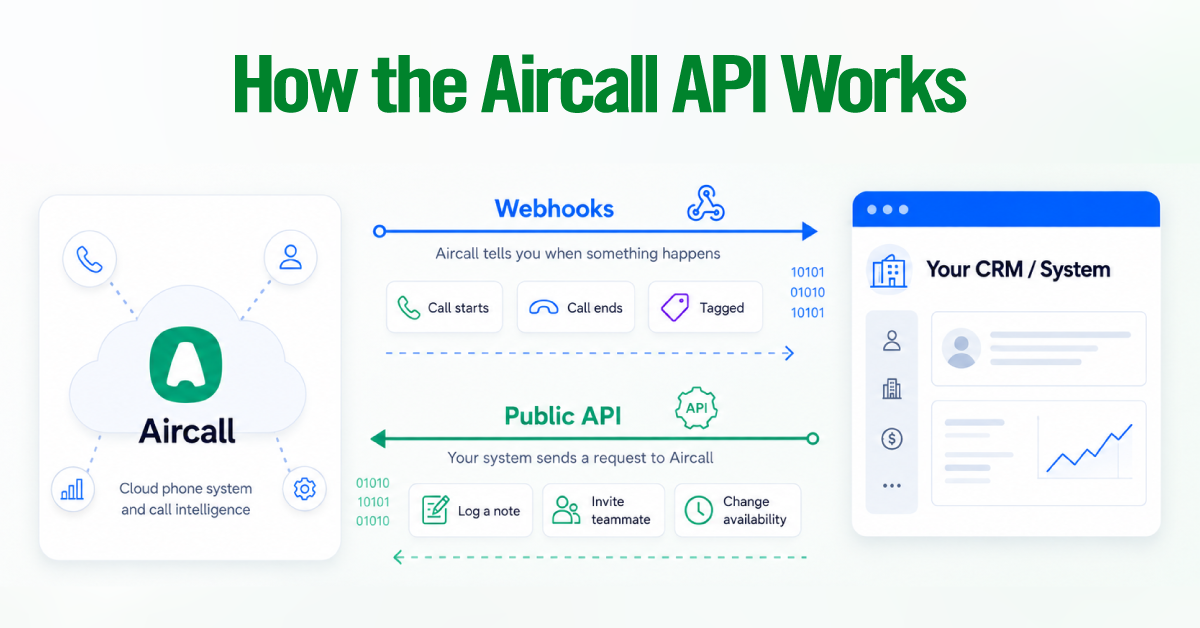
When a call starts, ends, or gets tagged, Aircall can notify your system the moment it happens. When you want to log a note against that call, invite a teammate, or flip an agent’s availability, your system sends a request to Aircall.
| Aircall tells you when something happens, and you tell Aircall to read or change something. The first direction is webhooks. The second is the Public API. |
Every Aircall CRM integration is some combination of those two moves, so once you can classify a requirement as either “listen for an event” or “send a request,” scoping stops feeling abstract.
The 3 ways to connect Aircall to a CRM or Tools
The table below is the honest trade-off between how fast you ship and how much you have to maintain.
| Approach | Setup effort | Sync reliability | Flexibility | Maintenance | Best for |
| Native marketplace connector | Low, one-click | High | Low to medium | None, Aircall maintains it | Standard call logging and screen-pop on a supported CRM |
| Automation platform (Zapier, Make) | Low to medium | Medium, not always instant | Medium | Ongoing, you own the rules | Non-technical teams and simple cross-app triggers |
| Custom Public API build | High | High, you control it | High | Ongoing, you own the code | Proprietary CRM, unusual data model, Marketplace app |
Native marketplace integration
This is the default, and for most teams it should be the finish line. If you run a supported CRM and your goal is reliable call logging, screen-pop, and field mapping, a native connector delivers all three with zero engineering time and zero ongoing maintenance, because Aircall keeps it working when either platform updates.
That covers Salesforce, HubSpot, Zendesk, and Front via the Aircall Workspace CTI, as well as Pipedrive, Zoho CRM, Intercom, Freshdesk, and more than 100 others. It also goes deeper than most people expect.
The Salesforce v3 integration adds a dedicated Aircall Log object for richer logging than Tasks alone can provide, and Insight Cards let you surface up to 5 fields from a Salesforce object in the agent’s in-call view. Before you scope anything custom, confirm the connector cannot already do it, because it usually can.
Automation platforms such as Zapier and Make
Reach for Zapier or Make when there is no native connector for a tool and the logic you need is simple. For example, dropping a row in a sheet or pinging a channel when a call ends. It is the right call for non-technical teams because it requires no engineering resources.
The strategic cost shows up later. You own every rule you build, so the integration is only as reliable as whoever configured it and only as documented as they left it. Syncing is not always instant, since these platforms poll or queue rather than fire the moment an event lands. And task or operation limits scale with call volume, which quietly becomes a recurring line item as you grow.
Custom Public API build
Build on the Public API only when a native connector cannot do the job, because you are trading a maintained, supported integration for one your team owns end-to-end. Three situations justify that trade. You run a proprietary or in-house CRM with no installation required.
Your data model is unusual enough that automatic field mapping cannot represent it. Or you are shipping a productized integration to the Aircall App Marketplace, which requires the OAuth flow rather than a private key. Outside those, a custom build tends to add maintenance without adding value.
How the Integration Works Under the Hood
Your CRM should remain the main source of customer data. Aircall should send call activity into the CRM, not create a separate version of the same records.
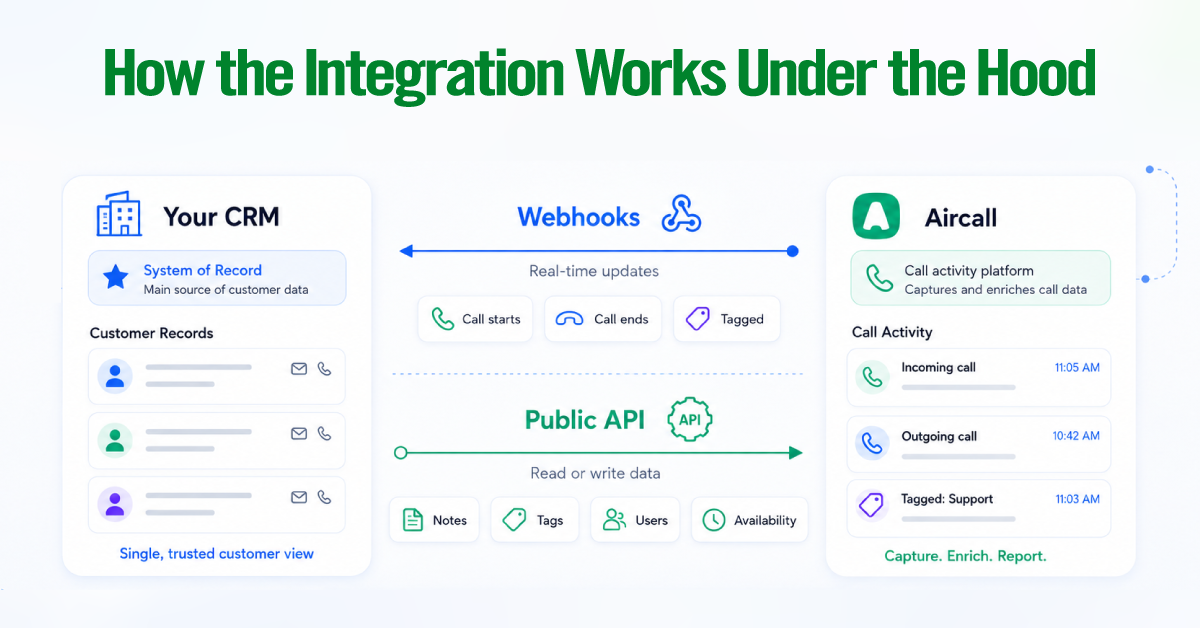
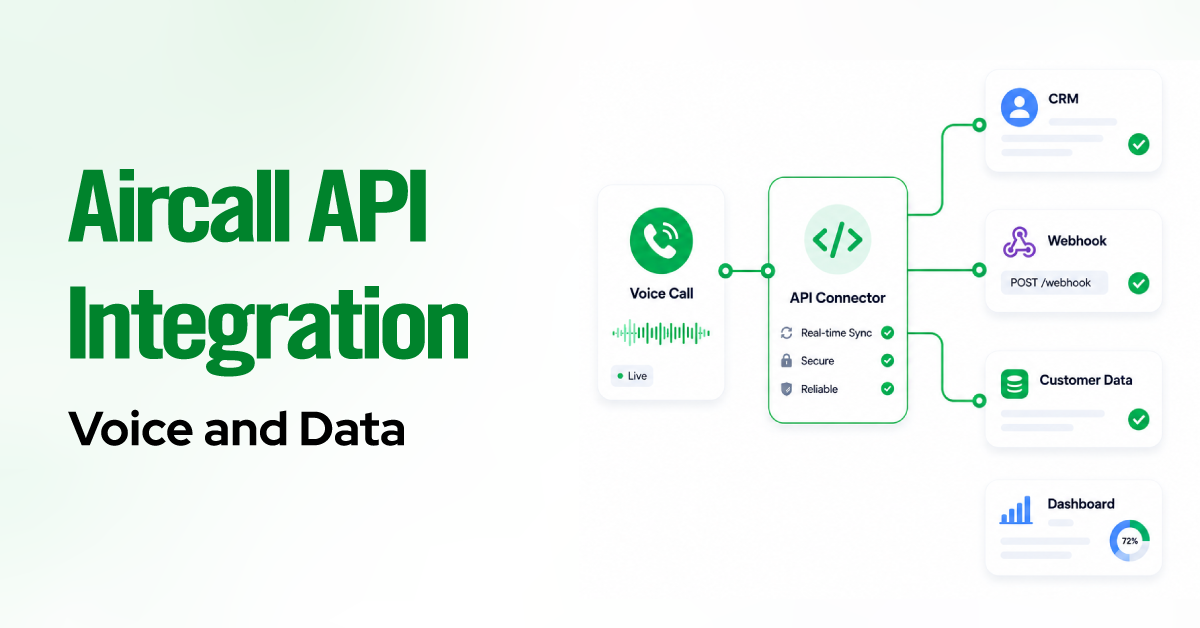
The integration works through two data flows:
- Webhooks push updates in real time. Aircall notifies your system when a call starts, ends, or receives a tag.
- The Public API handles requests. Your system uses it to read Aircall data or write back notes, tags, users, and availability changes.
In simple terms, webhooks tell you what happened, and the API lets you retrieve data or take action.
Aircall Webhooks: Handling Real-Time Push Events
Webhooks let Aircall push events to an HTTPS endpoint you control the moment they occur, which makes them the backbone of any real-time sync. You register the endpoint, subscribe to the events you care about, and Aircall sends an HTTP POST for each one. Most integrations lean on a small set.
- call.created and call.ended, the start and completion of a call
- call.commented and call.tagged, notes and tags added by agents
- contact.created, contact.updated, and contact.deleted, for two-way contact sync
- user.opened and user.closed, agent availability changes
| Execution rule. Your endpoint must return a 2XX status code, ideally 200, within 5 seconds. Aircall automatically disables a webhook after ten consecutive failed deliveries, so a slow or flaky endpoint gets switched off in production. |
Two habits follow from that rule. If an event kicks off slow work, such as downloading a recording or running analytics, hand it to an async job queue and return 200 immediately instead of blocking the response.
And verify authenticity with the unique token in every payload, rejecting anything that does not match. Aircall allows up to 100 webhooks per account, so there is room to separate concerns by event type.
The Aircall Public REST API: Data Pulls & Writes
The Aircall Public API is a classic REST API rooted at api.aircall.io/v1 and served only over HTTPS. It reads Aircall data and performs the write-backs that an integration actually needs.
- Log notes and tags against a call, up to five comments per call
- Invite and manage users with POST /v1/users
- Sync agent availability by updating availability_status with PUT /v1/users/{id}
- Trigger click-to-call with POST /v1/users/{id}/calls, or click-to-dial with POST /v1/users/{id}/dial
Pagination returns 20 results per page by default, up to 50, and Calls and Contacts are capped at 10,000 items even with pagination enabled. To access older records beyond that ceiling, use the from timestamp parameter instead of walking the entire list.
2026 Deprecation Notice: User V1 & Everywhere SDK V1
Two deprecations are live right now, and both change how you should build today. Aircall has begun retiring its User V1 endpoints and webhook events, with the V1 user endpoints scheduled for removal on 30 September 2026. Any new user management should target User V2 from the start. Separately, the original Aircall Everywhere SDK V1 is deprecated in favor of V2, so begin any CTI or softphone work on V2 to avoid rebuilding later.
Authentication, OAuth versus Basic Auth
Which method you use comes down to who you are building for, and the line is clean.
- Basic Auth is for an Aircall customer building their own account. An admin generates an api_id and api_token in the dashboard, and requests carry them Base64-encoded in the authorization header. The api_token is shown once and cannot be retrieved later, so capture it safely at creation.
- OAuth 2.0 is for technology partners building a Marketplace app that many Aircall customers use. It is required to list on the App Marketplace, which issues a non-expiring bearer access token, and only admins can install the resulting integration.
Admins also decide which phone numbers a partner integration can touch, which keeps a third-party app scoped to the numbers it actually needs.
What the Aircall API can and cannot do
The API is built for common CRM and workflow use cases, not deep telephony engineering, and knowing that boundary up front saves an expensive scoping mistake. It reads and writes call metadata, contacts, users, tags, and notes cleanly. It does not stream live audio or provide low-level call control via REST alone.
The Public API handles these well.
|
These need a different approach.
|
If your only goal is basic call logging on a supported CRM, stop here. The native connector already does it, and the API would add nothing but maintenance.
Aircall API compared with Twilio, RingCentral, and other options
Aircall is the right platform if your goal is to sync a business phone system with a CRM. Twilio is the right platform when you need to build telephony from primitives. RingCentral and similar suites sit in between.
| Platform | What it is | Flexibility | Build cost | Best fit |
| Aircall | Turnkey business phone with a REST API and prebuilt CRM connectors | Lower ceiling | Low | CRM sync and call center workflows |
| Twilio | Programmable communications you assemble from building blocks | Highest | High | Custom or embedded telephony products |
| RingCentral, Dialpad, 8×8, Zoom Phone | Broader UCaaS platforms with APIs | Medium | Medium | Unified communications with some custom needs |
The decision is less about which API is “better” and more about how much you want to build. If Aircall already gives you the phone system and you need it to talk to your CRM, Aircall plus its connectors is the shorter path. If you are constructing bespoke call flows or embedding voice inside your own product, Twilio’s lower-level control is worth the higher cost.
Security and compliance considerations
Treat API credentials like passwords and treat call recordings like the regulated personal data they are. Both principles drive the checklist below.
- Store the api_id, api_token, and any OAuth secrets in a secrets manager, and never commit tokens to source control. Because the api_token is non-recoverable, rotating a leaked key means minting a new one and updating every dependent integration.
- Verify webhook authenticity with the token in each payload, and reject requests that do not match a known value.
- Serve every webhook endpoint and API request over HTTPS only.
- Scope OAuth access to the phone numbers a partner app actually needs, which admins control at install.
- Handle call data under the regulations that apply to you, including GDPR, CCPA, HIPAA, and PCI-DSS. Recordings and transcripts are personal data, so minimize what you capture and where it lands.
For regulated workloads, settle the contractual coverage you need before you build. If you fall under HIPAA or handle cardholder data, validate your agreements with Aircall and design the integration to avoid capturing regulated fields you never needed in the first place.
Final overview
The best Aircall integration is almost always the simplest one that meets the requirement, because here simplicity is indistinguishable from reliability. Whichever path you take, the underlying architecture is identical.
Keep the CRM as the system of record; use webhooks for real-time events and the Public API for reads and writes; authenticate with Basic Auth for your own account or OAuth for a partner app; and design around the 120-requests-per-minute limit and the walls REST does not cross.
Get those foundations right, and the integration disappears into the background, which is exactly where a phone-to-CRM connection belongs.