Aircall Tagging Strategy for Sales Teams
TL;DR
- Unstructured Aircall tags create messy data. Fix it with three categories: Outcome, Pipeline Stage, and Intelligence tags.
- Keep the list to under 25 tags, make tagging mandatory, and connect every outcome tag to a CRM workflow so the tag handles follow-up automatically.
- Let AI Assist handle transcription and topic detection. Reps only confirm the outcome and stage.
- Audit quarterly, cut unused tags, and the list stays clean. Start with outcome tags and one workflow; everything else builds from there.
If you’ve ever tried to pull a call report from Aircall and ended up staring at a mess of overlapping tags with no clear owner, you already know the problem.
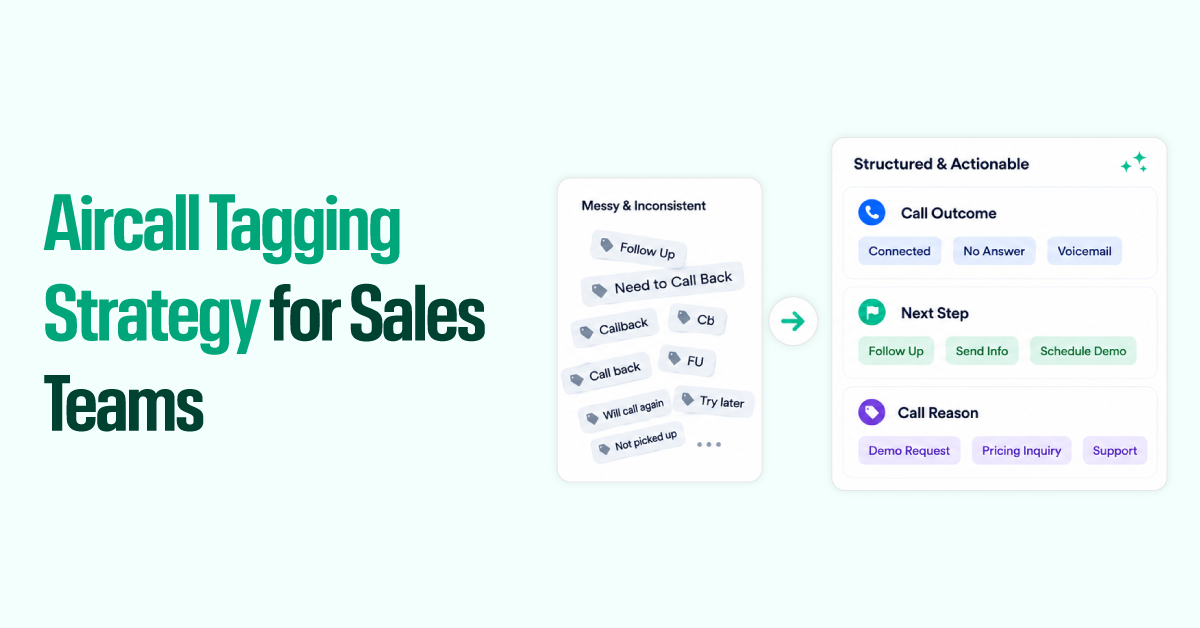
Tags like “Follow Up,” “Need to Call Back,” “Callback,” and “CB” all mean the same thing and sit in the same dropdown that your reps see multiple times a day.

Most Aircall tag lists aren’t designed properly. A rep needed a label, created one, and nobody cleaned it up. Months later, you’ve got 60 tags, no consistency, and data you can’t trust for forecasting or coaching.
The fix is a tag taxonomy: a short, opinionated list organized into 3 distinct categories, with clear rules for when each tag applies. Get that right, wire it to your CRM, and Aircall stops being a phone tool and starts being a revenue intelligence layer.
This guide walks through how to build that system: the categories, the tag list, mandatory tagging settings, and more.
Why is your sales call data a Black box?
Most teams struggle with Aircall tagging because their tags are unstructured, inconsistent, and disconnected from downstream systems.
Without a clear taxonomy, reps create duplicate tags like “Follow Up,” “Needs Callback,” and “CB Later,” which fragments reporting and makes the data unreliable. As the tag list grows, reps are more likely to skip tagging altogether, especially during high-volume call days when accurate data matters most.
And even when tags are used, they often don’t trigger CRM updates, workflows, or coaching insights, so the data gets captured but never turns into action.
Building Your Aircall Tag Taxonomy
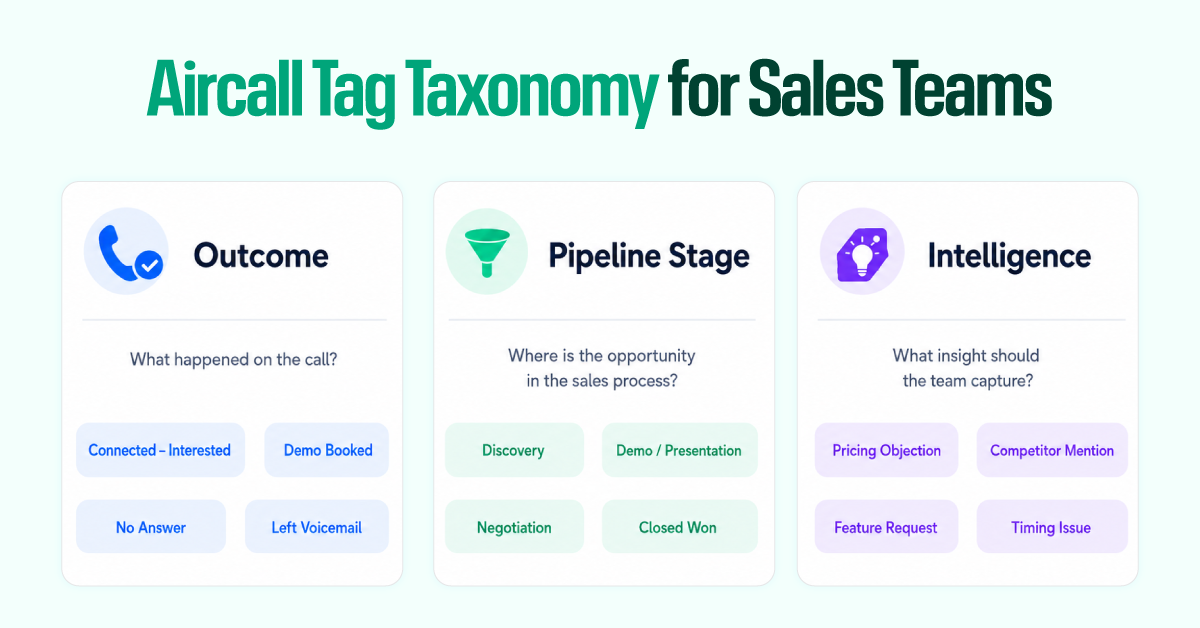
Keep the list short and specific enough that a rep never has to pause to decide. Split the tags into 3 major categories without mixing them. Train reps to think in those three buckets. It keeps the tagging fast and the data clean.
Every call typically gets one outcome tag, one pipeline stage tag, and one or two intelligence tags where relevant.
Outcome tags capture what happened at the end of the call. Pipeline stage tags capture where the deal stands. Intelligence tags capture what came up in the conversation. Here is an example of how you can do your tag taxonomy and categorize them:
| Category | Tag | When to Apply |
| Outcome | Connected – Interested | Rep had a real conversation; prospect engaged positively |
| Connected – Not Interested | Prospect explicitly declined or disqualified | |
| Demo Booked | A meeting or product demo was scheduled on this call | |
| Left Voicemail | Rep reached voicemail and left a message | |
| No Answer | Phone rang with no pickup, no voicemail left | |
| Wrong Number / Bad Data | The number is incorrect, disconnected, or doesn’t match the contact | |
| Callback Requested | Prospect asked to be called back at a specific time | |
| Qualified Out | Prospect confirmed not a fit for your ICP | |
| Pipeline Stage | Discovery | First substantive qualification call |
| Demo / Presentation | Product walkthrough or pitch call | |
| Proposal Sent | Follow-up call after sending a quote or deck | |
| Negotiation | Pricing, terms, or objection-handling stage | |
| Closed Won | Call confirmed deal closure | |
| Closed Lost | Call confirmed loss; prospect chose another path | |
| Re-engagement | Previously inactive or lost lead being contacted again | |
| Intelligence | Pricing Objection | Prospect raised the cost or budget as a concern |
| Competitor Mention | A specific competing product or vendor was named | |
| Feature Request | Prospect asked for functionality you don’t currently have | |
| Decision Maker Not Present | The right person wasn’t on the call; stakeholder mapping needed | |
| Technical Concern | Integration, security, or infrastructure questions raised | |
| Champion Identified | An internal advocate for your product was confirmed | |
| Timing Issue | Prospect is interested but not ready to buy yet |
Outcome tags are the backbone of connect rate reporting and data hygiene. Pipeline stage tags let managers pull all “Negotiation” calls for a specific rep and spot patterns without having to listen to every recording.
Intelligence tags are where the strategic value lives. Filter “Competitor Mention” against “Closed Lost,” and you’ve got actual competitive intel, not gut feel.
Mandatory Tagging
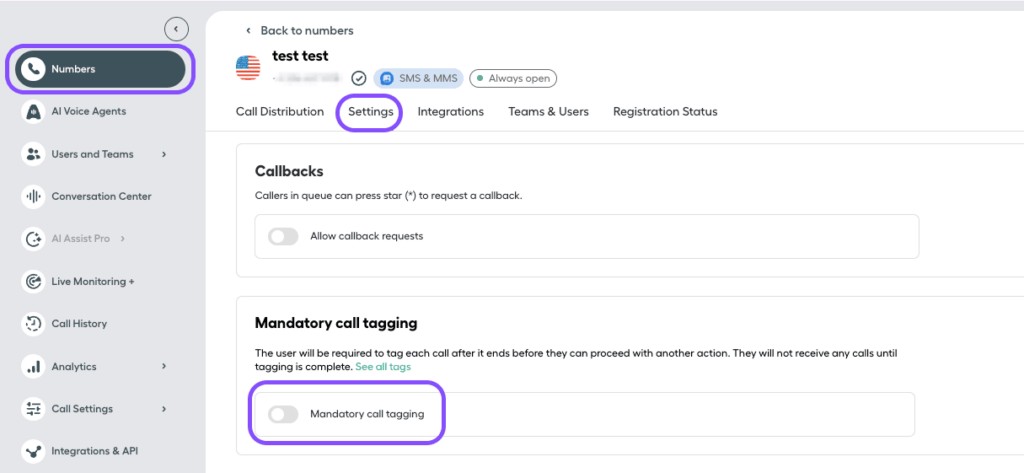
Aircall’s Professional plan lets admins make tagging mandatory, in which reps can’t close the wrap-up screen until they’ve selected at least one tag.
To enable mandatory tagging: Aircall dashboard → Settings → Phone → Tags → toggle on “Mandatory tagging.” Only Admins and Supervisors can create or edit tags; all users can apply them.
One thing worth knowing: Aircall currently applies tags across all phone lines. There’s no way to separate tags by team or number. If your sales and support teams share a workspace, prefix sales-specific tags (e.g., “Sales – Demo Booked”) to prevent the lists from bleeding together.
CRM Mapping & Workflow Automation
A tag applied in Aircall and never actioned anywhere else is just a label. The point of tagging is what it triggers.
How Tags Sync to Your HubSpot
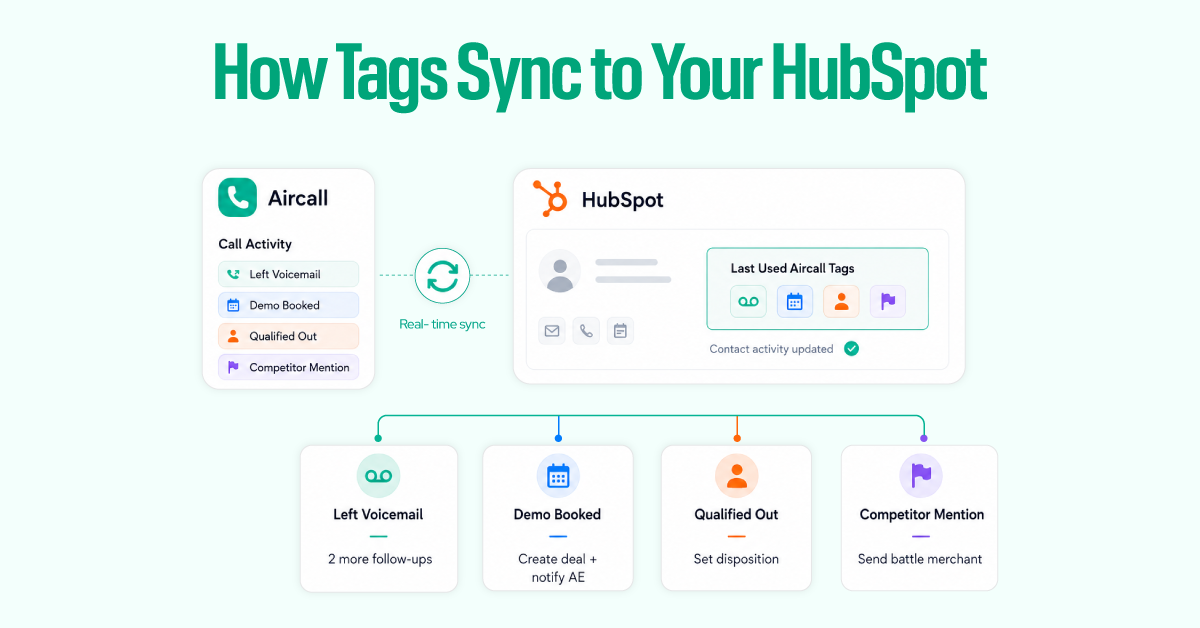
When Aircall is integrated with HubSpot, tags sync directly into call activity on the contact record. Aircall also auto-creates a set of custom contact properties during installation, including “Last Used Aircall Tags,” which become available as workflow enrollment triggers.
Every time a rep tags a call, this field updates, and any workflow enrolled on it fires. Build one master enrollment workflow with a branch for each outcome tag:
- “Left Voicemail” → Enroll in a 3-email voicemail follow-up sequence, spaced 2–3 days apart. This single automation recovers leads that would otherwise go cold with zero rep effort.
- “Demo Booked” → Create a deal in the sales pipeline, notify the assigned AE via email or Slack.
- “Qualified Out” → Set lead status to “Unqualified,” remove from active sequences.
- “Competitor Mention” → Send a Slack alert to the AE with a link to the relevant battle card.
Each branch handles routing automatically. The rep tags the call; the CRM does the rest. The sync is real-time; tags and recordings appear on the HubSpot contact timeline within seconds of a call ending.
How Tags Sync to Your Salesforce
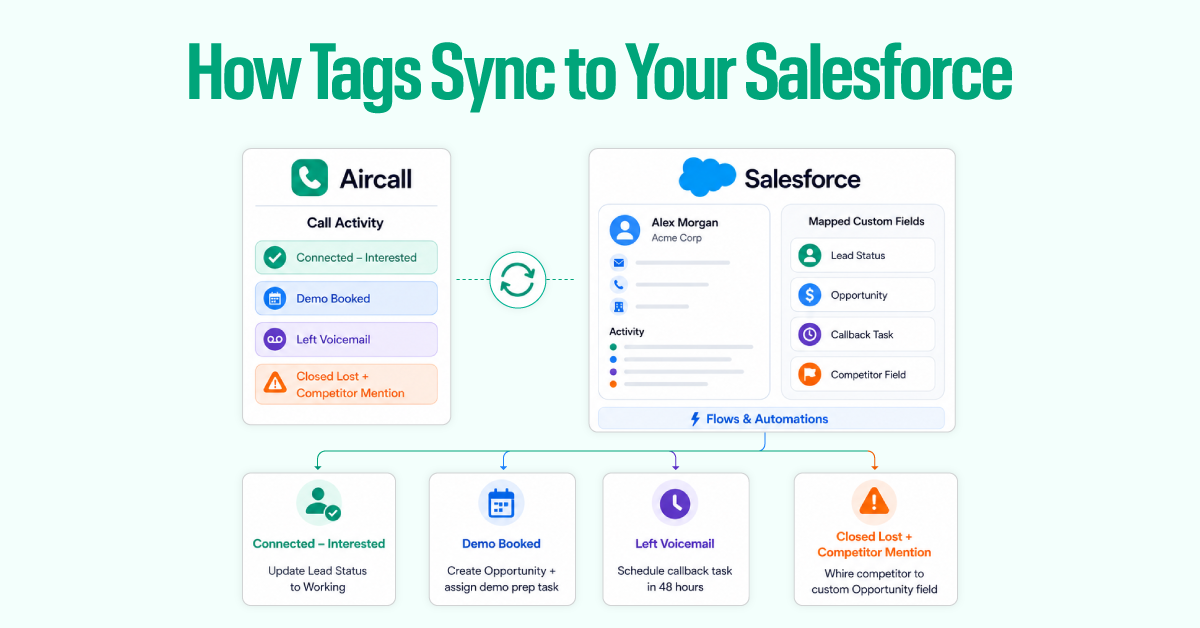
For Salesforce, Aircall pushes tag data into the call activity record. From there, you map it to custom fields on Lead, Contact, or Opportunity objects using Salesforce Flows. The same logic runs through Salesforce Flows instead of HubSpot Workflows:
- “Connected” → Update Lead Status to “Working”
- “Demo Booked” → Create an Opportunity, assign demo prep task to AE
- “Left Voicemail” → Schedule a callback task 48 hours out
- “Closed Lost” + “Competitor Mention”. Write the competitor name to a custom Opportunity field for win/loss analysis
One principle worth anchoring on: every outcome tag should trigger exactly one downstream action. If a rep has to do anything manually after applying the tag, the system isn’t finished yet.
Manual Tagging vs. Voice AI
Traditional after-call work looks like this: the call ends, the rep selects tags, writes notes, closes the wrap-up screen, and moves to the next call. On a day with 60–80 outbound dials, that’s 30–45 minutes of administrative time that isn’t selling.
Aircall’s AI Assist changes the equation. It automatically transcribes calls, generates a call summary within minutes, and flags key topics without the rep having to do anything. AI Assist Pro extends this further with real-time in-call coaching, automated CRM updates post-call, and follow-up email drafts ready the moment the call ends.
In practice, the division of labor looks like this:
AI handles:
- Transcription and call summary
- Key topic detection (objections, competitor mentions, sentiment)
- CRM field updates and follow-up email drafts
- Flagging calls that need manager review based on sentiment or missed qualification steps
Reps handle:
- Selecting the outcome tag (5 seconds, mandatory)
- Pipeline stage tag when a deal is advancing
- Any notes that need human context
Consider it like AI covering the intelligence layer, so reps only have to handle the judgment calls rather than AI replacing tagging. If you’re running AI Assist, review the auto-detected topics weekly. You’ll frequently find the system catching competitor mentions and objection patterns that weren’t making it into manual tags, and those gaps should shape how you refine your taxonomy.
3 Golden Rules for Team Adoption
The best tag system in the world is useless if reps don’t use it consistently. Adoption is a change management problem, not a technical one.
1. Keep it lean.
Cap your total tag list at 20–25 across all three categories. The moment a rep has to scroll or search, compliance drops. Tagging should take 30–45 seconds per call. If it’s taking longer, the list is too long. Fewer, well-defined tags produce more reliable data than a comprehensive list that reps guess at.
2. Show reps what they get out of it.
Reps don’t skip tagging because they’re disorganized. They skip it because nobody’s shown them why it matters to them. The pitch is simple:
- Tagging “Left Voicemail” automatically triggers the follow-up email sequence; they don’t have to remember to send it.
- Tagging “Demo Booked” creates the CRM deal — they don’t have to log it. When the tag does work on their behalf, they stop skipping it. Audit quarterly, not annually.
Pull a tag usage report every quarter. Delete any tag with fewer than 10 uses in 90 days. If reps aren’t applying it, it’s either redundant or unclear. Rename anything that’s generated consistent confusion based on rep feedback. Add new tags only when there’s a specific reporting or automation use case behind them. The tag list should get smaller over time, not bigger.
Conclusion
Most Aircall implementations are underperforming, not because of the tool, but because the tagging layer was never designed. Without a taxonomy, tags accumulate, reps skip them, and the data degrades until nobody trusts it.
The system described here has three components: a three-category taxonomy, mandatory outcome tagging, and CRM automation wired to every tag.
What it produces is a call history your RevOps team can actually segment, a coaching resource managers can actually use, and a workflow reps are motivated to maintain because it removes work from their day rather than adding to it.